Being a life-long programmer

Posted on

I read the following article this morning, and found a lot of useful insight in it about what it takes to be a programmer long-term. And, though I'm not approaching 55, as my 6 year old pointed out when I told him my age two weeks ago I am "almost near 100"... Yes I Still Want To Be Doing This at 56 I particularly identified with was the following paragraph

"The thing I find most important today is that you should never work longer, just smarter. Being older does mean you can't code 20 hours a day any more, or rather imagine you can code 20 hours a day as it's not really good coding. Is there a real limit to how many hours a day you can actually be producing a quality application? Probably it does go down over time but as long as you continue to learn how to code smarter the end result is still quality, just with less caffeine."

When I started out of school 15 years ago, it was very easy for me to just sit and bang out code with little preparation or thought put into it. I'd come back, if there was time, and clean up some bit or I'd come back months later and have no clue what I meant to do and kick myself for the decisions and shortcuts I'd take. Nowadays, I'm a lot more reflective when I start something, even if its a simple class. If I can, I bounce ideas off of colleagues, which at the minimum forces me to articulate the pros/cons of approaches I'm considering. I spend less time actually writing code, but have cleaner, easier to use code as a result and usually there's time re-factor and clean up the rough edges.
─── ✧ ─── ✦ ─── ✧ ───

Measuring developer productivity

Posted on

My friend Sandy shared a link to a fascinating natural experiment comparing the productivity of two similarly tasked developer teams. If you haven't read it already, take a minute to check it out. I've seen this need for visibility throughout my career.

The cable company was a rare laboratory, you could observe a direct comparison between the effects of good and bad software design and team behaviour. Most organisations don't provide such a comparison. It's very hard to tell if that guy sweating away, working late nights and weekends, constantly fire-fighting, is showing great commitment to making a really really complex system work, or is just failing. Unless you can afford to have two or more competing teams solving the same problem, and c'mon, who would do that, you will never know. Conversely, what about the guy sitting in the corner who works 9 to 5, and seems to spend a lot of time reading the internet? Is he just very proficient at writing stable reliable code, or is his job just easier than everyone else's? To the casual observer, the first chap is working really hard, the second one isn't. Hard work is good, laziness is bad, surely?

In agency work, you tend to track hours worked on a project. I'd bristle when each quarter the list of "most billable" employees. Great! If those folks are junior developers, chances are their also creating a lot of "billable" work that pulls in other people. A list of people who were the busiest in the last 3 months, when you should be encouraging people to get the most done in the least amount a time. A better metric, though harder to calculate and report, would be to figure out revenue per hour. That's not so difficult to do per project, but it gets hairy in trying to tie it directly to people but it can be done. If you're part of an internal development team, upper management may use "seeing butts in seats" as a proxy for people getting work done. This encourages people to hang around just to look busy, and discourages using  remote workers. In this case, metrics you'd like to look at are more tied to business outcomes, things like site uptime, conversion rates, sales, etc. Still, if you want to measure actual productivity, in terms of what tasks your development team what can you do? This is where I think a good habit of issue+SCM tracking, rigorous testing , and continuous integration can really shine.

  • Issue tracking can let you report the number of issues you've addressed.
  • Unit testing can report on the health of your code base by looking at test coverage, number of tests added/created, etc.
  • Continuous integration can then give you ongoing performance metrics. How often are we producing successful builds? How often are we deploying code to production?

I'm sure that just scratches the surface of what you can do. How do you measure developer productivity?

─── ✧ ─── ✦ ─── ✧ ───

Colorized Word Diffs

Posted on

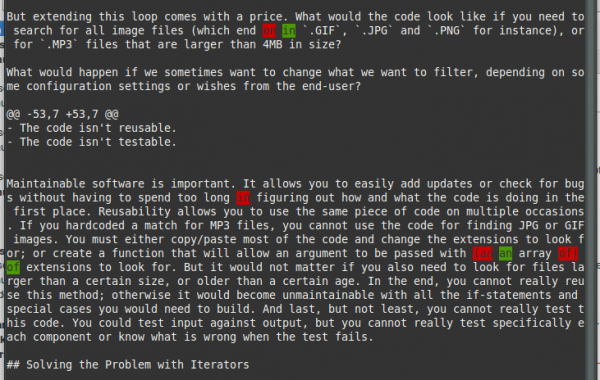
I've been finding myself doing a lot for copy and tech editting. I needed a way to annotate a PDF based on the changes I'd made to our markdown source. Trying to eyeball this was difficult, and I checked if there was a way to do word-by-word diffs based on SVN output. Remember, SVN's diff command will show line-by-line differences. But there is a Perl script wdiff that will show you word by word diffs. With a bash alias, you can pipe svn output to it and see what's been added/removed more clearly.  Once you install wdiff, either from source or via your distributions package manager, create an alias (I use bash) that will colorize its output:

alias cwdiff="wdiff -n -w $'\033[30;41m' -x $'\033[0m' -y $'\033[30;42m' -z $'\033[0m'"

wdiff compares two files by default but in can also parse the output of a diff file. By piping svn diff to it, you can see the changes word for word. In the example below, I'm reviewing the changes made by a specific commit and using less to page the output, the -r flag keeps the colors intact.

svn diff -r 267 -x -w 05.chapter.markdown | cwdiff -d | less -r

Words that were deleted will be in red, additions are in green. color-diff

Update:

Git has this behavior built in using:

git diff --color-words

Also, if you need to share your changes with a designer (who maybe needs to update a PDF...), with this ansi2html script from pixelbeat.org, you can generate HTML output showing your changes. I found that its useful to run the generated HTML through fold so that the lines wrap if you email it to someone.

svn diff foo.markdown | cwdiff -d | ~/bin/ansi2html.sh | fold -s > foo-updates.html

Finally, you can wrap all this functionality into a simple bash script that you can save anywhere. Pipe it the output of a svn diff or diff command, and get nice HTML as a result. It assumes ansi2html is somewhere in your executables \$PATH.

#!/bin/bash
# take diff input (from svn diff too), colorize it, convert it to html

cat - | wdiff -n -w $'\033[30;41m' -x $'\033[0m' -y $'\033[30;42m' -z $'\033[0m' -d \
| ansi2html.sh | fold -s

Tags: Linux

─── ✧ ─── ✦ ─── ✧ ───